通过 GitHub Desktop 推送到 GitLab 时出现以下报错,最开始以为只是要验证密码,然后把账号密码输入十多次并没有,也尝试将仓库地址改为SSH格式(会一直卡着)。 还以为是GitLab不能用了。
Authentication failed. Some common reasons include:
- You are not logged in to your account: see File > Options.
- You may need to log out and log back in to refresh your token.
- You do not have permission to access this repository.
- The repository is archived on GitHub. Check the repository settings to confirm you are still permitted to push commits.
- If you use SSH authentication, check that your key is added to the ssh-agent and associated with your account.
- If you use SSH authentication, ensure the host key verification passes for your repository hosting service.
- If you used username / password authentication, you might need to use a Personal Access Token instead of your account password. Check the documentation of your repository hosting service.
后来才知道是GitLab修改了政策,
其实错误提示中已经说明:
- If you used username / password authentication, you might need to use a Personal Access Token instead of your account password. Check the documentation of your repository hosting service.
- 如果您使用用户名/密码身份验证,您可能需要使用个人访问令牌而不是您的帐户密码。检查存储库托管服务的文档。
GitLab 已经取消直接使用“账号+密码”进行 HTTPS 认证的方式。输入了登录密码,GitLab 的安全机制会直接拒绝访问,从而导致 GitHub Desktop 报错。
那如何恢复认证,继续操作仓库的拉取和推送?只需去GitLab创建一个令牌,然后在GitHub desktop弹出验证账号对话框时,输入账号,并且在密码输入框输入刚刚创建的令牌。
创建 GitLab 个人储存令牌
创建令牌具体流程如下:
- 打开并登录 https://gitlab.com/
- 访问 https://gitlab.com/-/user_settings/personal_access_tokens
- 手动操作路径:右上角头像→个人资料→(左侧菜单)选择Access-个人存储令牌
- 个人存储令牌页面点击「个人存储令牌」(Personal Access Token,)右上角「生成令牌-旧版令牌」
- 填写令牌名称,选择过期时间(之后无法修改)
- 选取权限范围(Push 和 Pull 只需读写权限即可):
- read_repository 读取仓库(储存库)
- write_repository 写入仓库(储存库)
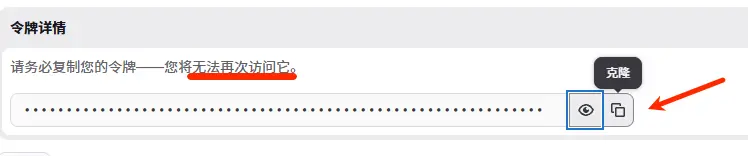
- 创建成功,复制并自行保存好令牌(token),因为以后无法在gitlab查看这个令牌
转载请注明转自: 一极乐( https://yijile.com/zh/github-desktop-push-gitlab-authentication-failed/ )

本文采用
CC BY-NC-SA 4.0
方式授权。
转载请注明出处和本文链接,说明是否进行修改,不得用于商业用途,使用相同方式共享。
